 frequently asked questions
How do I get rid of the pop up message telling me that there is a new version of pdfMachine available?
In the pdfMachine options, on the General tab there is a check-box "Weekly online check for new version". If you remove the check from this box you won't be prompted when a new version of pdfMachine is available. You can also create a customized installer with this turned off.
How do I stop pdfMachine offering to email PDFs which cannot be opened?
When pdfMachine is unable to open a PDF a message is displayed offering the user to email it to Broadgun Software for analysis. Somebody from Broadgun Software will reply to let you know what the problem was and whether there is a solution.
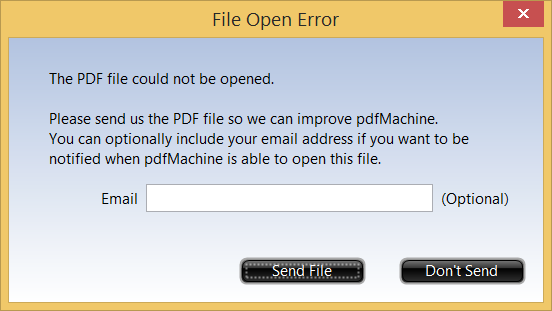
If you do not want this message to appear you can modify the registry entry:
HKEY_CURRENT_USER\Software\pdfMachine\BroadGun pdfMachine\showSendFileHomeDlg
Set it to 0 to prevent the dialog displaying, or to 1 to allow pdfMachine to display the dialog.
Warning : you should not modify the registry unless you know what you are doing. You should back up the registry first.
If you are creating an installer using the pdfMachine configurator you can use "showSendFileHomeDlg=0" to have it default as off.
How do I set Windows to open PDF files using pdfMachine by default?
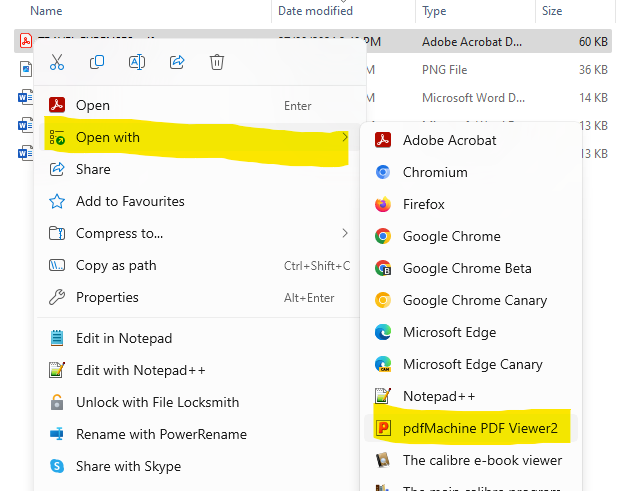
Using pdfMachine 20.26 and later you can right-click on a PDF file in Windows Explorer and choose Open With. pdfMachine will appear in the list of applications that can open PDF files. Select it and click Always to make pdfMachine the default PDF viewer.
How do I create a custom page size?
Go to Control Panel
- Administrative Tools
- Print Management
- Printer Servers
- [computer name]
- Forms, Click on "Action menu | Manage Forms "
How can I run a batch file in "Next Action" command line?
To specify a batch file or script to execute upon PDF generation, bring up the pdfMachine options and select 'Next Action' then set 'Next Action' to 'Execute command line'.
New limitations in Windows have made it so that batch files will only run if you pipe the output to
another file.
For example, you can set the command line to "cmd /c c:\YourName.bat %s > c:\YourNameOut.txt".
The %s is substituted with the name of the pdf file produced, and any output from your batch file is
sent to c:\YourNameOut.txt.
Alternatively, you can run other executables, including cscript.exe such as .
cscript.exe c:\touchx.js "%s"
Why does my PDF open outside of the pdfMachine window?
If you are opening a PDF or printing to pdfMachine and the PDF is displaying in a standalone Adobe Reader window rather than inside the pdfMachine window then you may have your Next Action set to "Launch Default PDF Viewer". If Acrobat Reader is your default viewer. If you want it to display inside pdfMachine then change your next action to be "Launch pdfMachine Viewer".