 version protection
Stay up to date with pdfMachine - Version Protection
Version protection is free for the first year, expiring one year from the purchase date. Extensions can then be purchased for 1 year or 2 year periods. When you register your version protection it extends your existing expiry date for the period purchased (i.e. 1 or 2 years).
Keeping your version protection current entitles you to use the latest and greatest pdfMachine releases, making the most of new features and fixes when they become available. Your licence is only valid for versions of pdfMachine released before the version protection expiry date. Current version protection also means you are entitled for product support.
Does my license expire?
No, your pdfMachine license doesn't expire, however the version protection of it does. This affects which versions of pdfMachine your license entitles you to.
What happens when my version protection expires?
When your version protection expires, your current pdfMachine / pdfMachine merge version will keep on working - however you will not be entitled to install new versions and use them in non demo mode. You can purchase additional version protection to extend your expiry date. The additional version protection starts from the version protection expiry date of your existing pdfMachine pdfMachine / pdfMachine merge license, not from the date of purchase.
Only the current version of pdfMachine is supported.
Which version protection do I need?
Each edition needs its own version protection. For example, pdfMachine office needs pdfMachine office version protection, pdfMachine ultimate needs pdfMachine ultimate version protection.
Version protection extends from the current expiry date, so you need as many additional years as it takes to add to your expiry date to get past the current date.
Purchase version protection nowHow do I know when my version protection will expire?
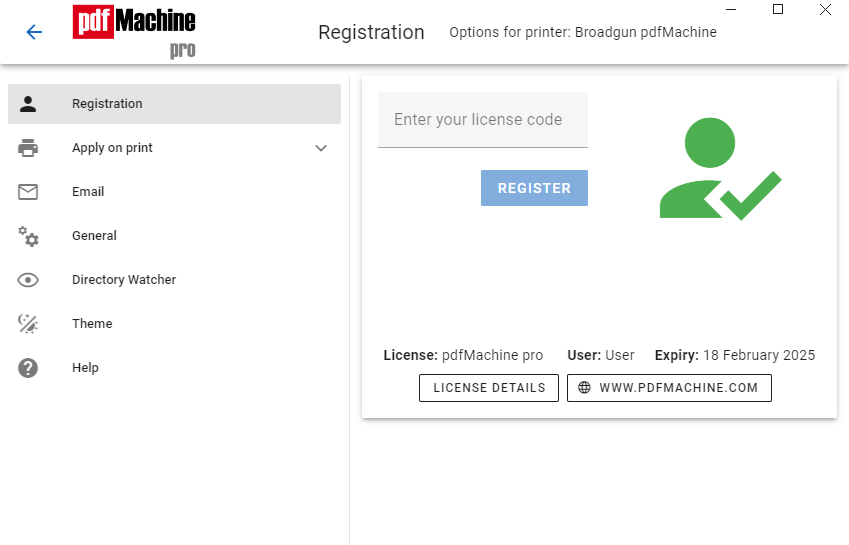
On the PC where you have installed pdfMachine open from the Start Menu :
Select "All Programs | BroadGun Software | BroadGun pdfMachine Options"
Select the "Registrations" menu option.
You will now see the date of expiry of your version protection.
How do I see which keys I have registered with?
Click the Licenses Details button on the registration tab of pdfMachine options to see a list of licenses which you have registered on that device.